
Shoot Once: 3 Workflows for Vertical vs Horizontal Video
Choose vertical (9:16) when the destination is TikTok, Reels, or Shorts, and horizontal (16:9) when the destination is YouTube’s main feed, a website, or a television screen. The smartest working method is to shoot wide and compose the action inside a centered vertical strip so that one production yields both deliverables without a second shoot.
TL;DR:
- Shooting for the primary platform first ensures the correct aspect ratio, with vertical for TikTok, Reels, and Shorts, and horizontal for YouTube’s main feed or TV.
- Composing within a centered vertical strip during a horizontal shoot allows for later cropping without losing important action or subjects, saving costs on reshoots.
- Studies show vertical videos lead to higher engagement and completion rates, especially among younger viewers, but performance varies by audience and platform.
- Planning and briefing talent on platform-native framing before shooting reduces costly rework, with the option of dual-camera setups or higher-resolution shooting for flexible post-production reframing.
- Platform-specific nuances in resolution, compression, and encoding make native vertical files at higher resolutions preferable for maintaining quality across social media channels.
Table of Contents
- Vertical Video vs Horizontal: What the Platform Decides for You
- Vertical vs Horizontal at a Glance: Strengths, Weaknesses, and Best Use Cases
- How to Shoot Once and Deliver Both Orientations
- What the Data Actually Shows About Orientation and Performance
- A Quick Checklist Before You Pick an Orientation
- The Agency View on Briefing Talent for Multi-Format Deliverables
- Vertical and Horizontal Weren’t Always Rivals
- Resolution, File Size, and Encoding: The Technical Side of Orientation
- Our Take: Stop Treating This as a Binary Choice
- Book Talent Already Briefed for Vertical-First Production
- Sources
- FAQ
Vertical Video vs Horizontal: What the Platform Decides for You
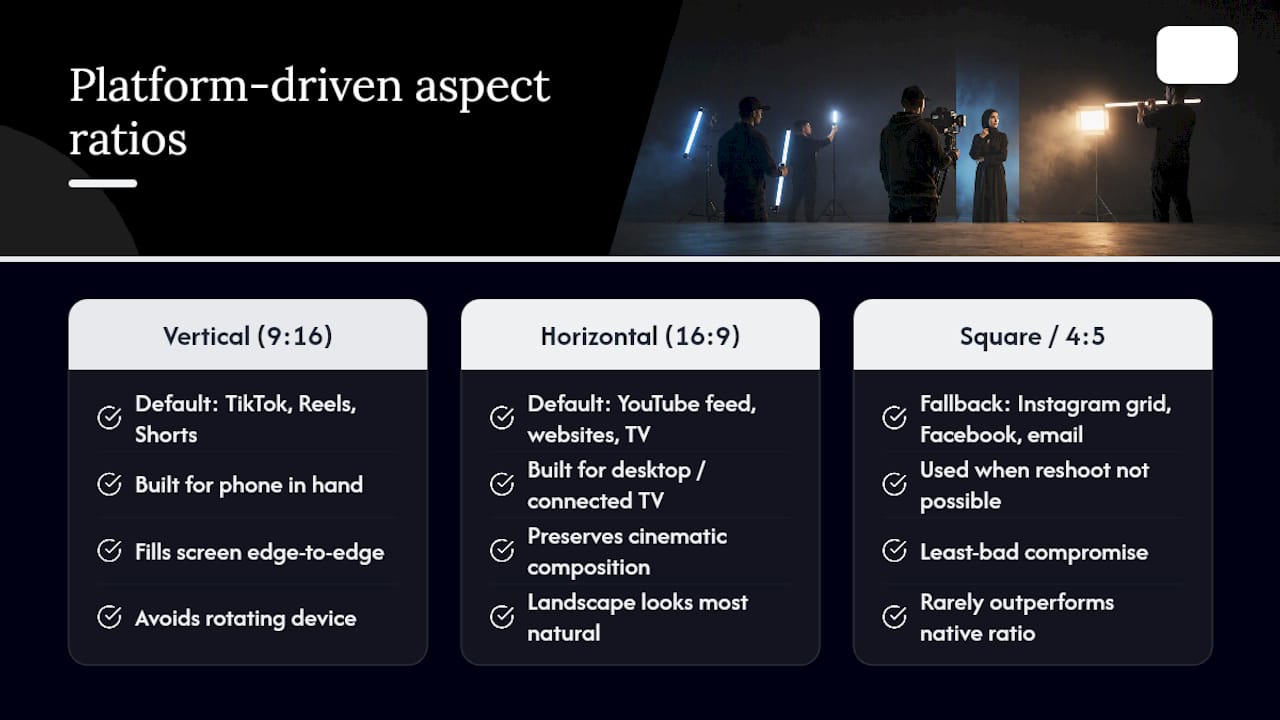
The platform your audience opens first should decide your aspect ratio before a single frame is composed. TikTok, Instagram Reels, and YouTube Shorts default to 9:16, filling the entire phone screen edge to edge because that is how those apps were engineered to hold attention. Vertical video was built for the phone in your hand, and every scroll gesture on those platforms assumes a full-bleed portrait frame.
YouTube’s main feed, brand websites, and television still run on 16:9. That is not nostalgia. Desktop browsers, connected TVs, and YouTube’s homepage grid are built around widescreen real estate, and cropping a cinematic establishing shot into a vertical column often guts the composition that made it work in the first place.
Square (1:1) and 4:5 exist as fallbacks, not first choices. Production guides consistently treat square as a least-bad compromise reserved for cases where a reshoot isn’t possible and the same file has to survive Instagram’s grid, Facebook’s feed, and an email newsletter at once. It rarely outperforms a platform-native ratio.
The UX logic behind this split traces back to something almost embarrassingly simple: people don’t like rotating their phones. Scientific American’s analysis of viewing ergonomics notes that video looks most natural in landscape, yet we hold our phones upright almost all the time. Vertical video removes the friction of turning the device, which is exactly why passive, endless-scroll feeds adopted it first.
When your audience splits across a short-form app and a website or connected-TV app, prioritize the platform carrying the larger share of your campaign budget or the bulk of your target audience, then treat the other orientation as a secondary export rather than an equal creative brief.
Vertical vs Horizontal at a Glance: Strengths, Weaknesses, and Best Use Cases
Vertical and horizontal formats aren’t competing for the same job. Each one solves a different storytelling problem, and the smartest creators match the format to the scene rather than to habit.
Vertical (9:16) strengths:
- Fills the entire mobile screen with no black bars, which raises in-feed attention on scroll-based apps.
- Creates an intimate, close framing that suits talking-head content, tutorials, and product-in-hand demos.
- Matches how phones are naturally held, reducing friction for passive viewers.
Vertical weaknesses:
- Struggles with wide establishing shots, landscapes, or any scene where context matters more than a single subject.
- Looks cramped or awkward when played back on a TV or desktop monitor.
- Multi-person dialogue scenes often force an uncomfortable choice between showing one speaker at a time or shrinking everyone into a tight column.
Horizontal (16:9) strengths:
- Delivers cinematic framing with room for environment, movement, and multiple subjects in one shot.
- Remains the standard for websites, YouTube’s main feed, and television, where widescreen viewing is the default.
- Handles group interviews, product demos with surrounding context, and landscape or architecture footage far better than a cropped vertical frame.
Horizontal weaknesses:
- Shrinks to a fraction of the screen inside a vertical feed, surrounded by dead space.
- Can feel like a repurposed afterthought when dropped into TikTok or Reels rather than shot for them.
A single talking-head explainer works fine in either orientation. A sweeping landscape shot or a three-person panel almost always needs the horizontal frame to breathe.
How to Shoot Once and Deliver Both Orientations
Reshooting the same scene twice for two aspect ratios is the most expensive way to solve this problem. Three workflows let a single production survive both formats without sacrificing quality.
- Two-camera simultaneous capture. Mount a second camera in portrait orientation alongside your primary horizontal setup. This costs more in gear and a second operator but eliminates reframing risk entirely, since both files are native captures rather than crops.
- Shoot 16:9, compose for a centered 9:16 strip. Frame every important action, gesture, or line of dialogue inside the middle third of the widescreen frame. This composing-for-crop approach preserves the wide file for websites and YouTube while letting editors pull a clean vertical cut later without losing the subject.
- Shoot in 4K, reframe in post. Capturing at a higher resolution than your final delivery gives editors room to punch in and reposition the frame digitally, which works well for static or slow-moving shots but falls apart on fast handheld action.
On set, turn on your camera’s 9:16 overlay guides even when the final master is horizontal. Keep subjects inside that center column, and build margin around the edges for captions, since UI overlays on vertical players routinely cover the bottom and right portions of the frame.
In the edit, manual keyframe reframing beats automatic reframe tools for anything with movement, dialogue, or more than one subject. Automatic tracking tools, including AI-assisted reframing systems, speed up simple static shots but frequently misjudge which subject matters in a multi-person frame. Export at platform-specific resolutions rather than one universal file, and check every caption and logo placement in an actual device preview before publishing.
Pro Tip: *Build your shot list around the two-camera method only for hero content with a real budget behind it.
Two-camera setups add cost and a second operator to every call sheet. The composed-for-crop method costs nothing extra beyond planning discipline. Reframing in post costs the least upfront but risks the most rework if the footage wasn’t shot with a crop in mind. A detailed production budget breakdown helps brands decide which trade-off fits a given campaign before cameras roll.
What the Data Actually Shows About Orientation and Performance
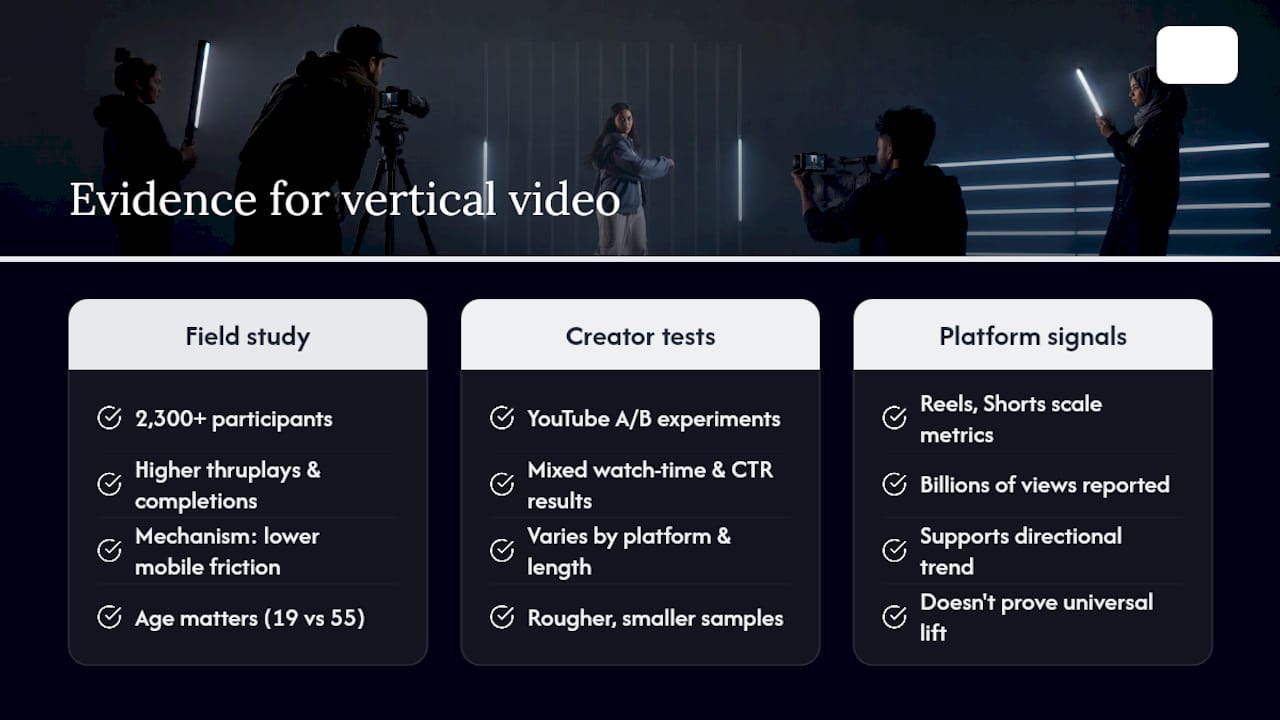
The strongest evidence for vertical’s edge comes from a large-scale field study and two follow-up experiments involving more than 2,300 participants, which found that mobile vertical video ads generated higher thruplays and completion rates than horizontal ads. The mechanism behind that lift isn’t mysterious: vertical video requires less physical and cognitive effort to process on a smartphone screen, and that lower friction increases the odds a viewer watches through to the end.
Younger viewers process vertical formats more fluently on mobile, which makes the format especially effective with Gen Z audiences in short organic and paid placements.
That age moderation matters more than most marketers give it credit for. The same creative can perform differently in vertical depending on whether the audience is 19 or 55, so a blanket “vertical always wins” claim oversimplifies a finding that was always conditional.
Independent creator experiments add a second layer of evidence, though a rougher one. YouTube-based A/B tests comparing identical footage across orientations show watch time and click-through differences that vary by platform and video length, not a consistent universal winner. Platform-level statements back the directional trend at scale: The Verge’s reporting on vertical video’s dominance notes Reels has become a multi-billion-dollar line of business for Meta, and YouTube has reported enormous daily Shorts view counts.
None of this evidence generalizes perfectly. Algorithm updates shift constantly, ad-context studies don’t always predict organic performance, and a study run on one platform in one year doesn’t guarantee the same lift two years later on a different app.
A Quick Checklist Before You Pick an Orientation
Run through this before the camera comes out, not after the edit is already underway.
- Identify the primary platform first. Where will most of the campaign’s views come from? Let that answer set your home ratio, not personal preference.
- Decide upfront whether you need multi-platform deliverables. If yes, choose one of the three dual-format workflows before the shoot day, not during the edit.
- Budget for the trade-off. Two-camera and dedicated reshoots cost more time and crew, but they cut reframing risk to near zero; a single shoot-wide approach is cheaper but demands tighter on-set discipline.
- Watch for red flags on playback. Captions sitting inside a UI overlay zone, subjects drifting near the crop edge, and ignoring platform-specific safe areas are the three most common reasons a “dual-format” shoot fails in review.
- Write the brief before you cast. A clear creator brief that states the target ratio and safe-area rules up front saves far more time than fixing framing problems after delivery.
The Agency View on Briefing Talent for Multi-Format Deliverables
Booking the right creator matters less than briefing them correctly before the call sheet ever goes out. An agency-grade brief specifies the platform, the ratio, and the safe-area rules before casting even begins, so the talent on set already understands they’re composing for a centered column rather than a full widescreen canvas.
An agency can build platform-native framing into the brief stage to prevent expensive rework later in production. A creator who understands they’re delivering vertical-first content, with a horizontal master as backup, shoots differently from one who finds out in the edit bay that half their footage won’t crop cleanly. Rights and usage terms matter here too: confirm whether the license covers reformatted, reframed, or resized derivatives, not just the original master file, before the shoot day arrives.
Vertical and Horizontal Weren’t Always Rivals
Vertical video is not a recent invention dressed up as a trend. Early mobile phone cameras in the 2000s defaulted to portrait orientation simply because that’s how people held the device, long before any platform built a feed around it. For most of film and television history, though, horizontal ruled uncontested. Cinema, broadcast TV, and early YouTube all inherited the 4:3 and then 16:9 widescreen standard because that shape matched how the human eye naturally scans a wide field of view.
The shift began around 2013, when Snapchat built its entire interface around full-screen vertical video, betting that mobile-first meant portrait-first. Instagram Stories followed the same logic in 2016, and TikTok’s 2017 global expansion cemented vertical as the default grammar of short-form content rather than an exception to widescreen norms.
What changed wasn’t taste. It was product design. Platforms discovered that a full-screen vertical feed kept people scrolling longer and created more inventory for ads between clips, so they built their entire user experience, from autoplay to caption placement, around that assumption. YouTube’s later launch of Shorts and Meta’s build-out of Reels were catch-up moves, not innovations, chasing a format TikTok had already proven at scale. Horizontal never disappeared. It simply retreated to the contexts, television, desktop browsing, long-form storytelling, where widescreen still serves the viewer better than a cropped column ever could.
Resolution, File Size, and Encoding: The Technical Side of Orientation
Orientation changes more than composition. It changes the math behind resolution, file size, and how a video encodes for delivery.
A standard vertical 9:16 export at 1080 by 1920 pixels contains the same total pixel count as a horizontal 1920 by 1080 file, so resolution alone isn’t the deciding factor in file size. What matters more is bitrate and platform compression. TikTok, Reels, and Shorts all apply aggressive compression on upload, which means footage with heavy motion or fine detail can look noticeably softer after processing than it did in your original export. Shooting at a higher source resolution, 4K rather than 1080p, gives the platform’s compression algorithm more data to work with before quality drops.
Frame rate consistency matters just as much as resolution. Mixing 24fps cinematic footage with 30fps or 60fps clips in the same vertical edit can create a jarring motion mismatch once everything gets compressed and re-encoded by the platform. Keep frame rate consistent across every clip destined for the same deliverable.
Codec choice affects both file size and upload speed. H.264 remains the safest universal export for cross-platform delivery, while H.265 (HEVC) produces smaller files at similar quality but isn’t universally supported by every platform’s upload pipeline. When exporting for multiple orientations from the same 4K master, always export the vertical crop as its own dedicated file rather than letting a platform auto-crop your horizontal upload, since native uploads consistently preserve more detail than a platform’s automatic reframe.
Our Take: Stop Treating This as a Binary Choice
The conventional advice, pick vertical for social and horizontal for everything else, isn’t wrong, but it treats orientation as a one-time decision instead of a production discipline. The real skill isn’t choosing a ratio. It’s building a shoot that survives being cut both ways without either version looking like an afterthought.
Most creators overinvest in the platform debate and underinvest in the on-set discipline that actually determines whether dual-format delivery works. Composing for a centered safe area costs nothing extra beyond planning. Skipping that step is what forces expensive reshoots or forces a team to publish a horizontal clip cropped down to an unusable vertical frame days before launch.
If you take one thing from the evidence: the age moderation effect and the platform-specific watch-time differences prove there’s no universal winner, only a correct answer for a specific audience on a specific platform. Brief for that answer before casting, before shooting, and definitely before the edit begins. That single habit prevents more wasted footage than any camera upgrade or reframing tool ever will.
— ANT
Book Talent Already Briefed for Vertical-First Production
Most brands lose time not on the shoot itself, but on discovering mid-edit that the talent, framing, or footage doesn’t survive the crop to vertical. This can be solved earlier, at the casting and briefing stage, by pairing brands with creators, models, and full production crews who already understand platform-native framing before the call sheet goes out.
Whether the project needs a single creator for a Reels campaign or a full crew for a multi-orientation shoot, ANT Management’s talent booking and full production crew booking services connect brands with vetted professionals across fashion, commercial, and creator categories. Coordinating creators for influencer-driven vertical content is handled through influencer marketing bookings, with talent selection and briefing built into the process from the first call. Start by outlining your platform and format needs at Antmgmt to get a curated talent shortlist for your next shoot.
Sources
This article draws on a peer-reviewed field study on mobile vertical video effectiveness, platform-trend reporting from The Verge, practical shooting guidance from CutScore, and format standards outlined by Shopify.
- Mobile vertical video marketing effectiveness — International Journal of Research (DOI)
- The Verge column on vertical video dominance
- Vertical vs Horizontal Video — CutScore
- How To Use Vertical Videos for Social and Website Content (Shopify)
FAQ
Should I Film Vertically or Horizontally?
Film vertically if your primary destination is TikTok, Reels, or Shorts, and horizontally if it’s YouTube’s main feed, a website, or television. When you’re unsure of the destination, shoot horizontal and compose for a centered vertical strip so you can cut either version later.
Does Vertical Video Actually Perform Better Than Horizontal?
A large field study and two experiments found vertical mobile ads produced higher completion rates and engagement than horizontal ads, though the effect was stronger among younger viewers. Performance differences vary by platform, ad length, and audience age, so vertical isn’t a universal winner in every context.
What Aspect Ratio Should I Use for YouTube?
YouTube’s main feed and homepage are built around 16:9 horizontal video, while YouTube Shorts uses 9:16 vertical, so the correct ratio depends entirely on which surface you’re targeting within the platform. Uploading the same video to both formats usually requires a separate vertical export rather than one universal file.
Can I Reuse the Same Footage for Both Orientations?
Yes, if you shoot with the crop in mind from the start, either through a two-camera setup, a centered-composition technique, or a higher-resolution 4K capture that leaves room to reframe in post. Footage shot without that planning usually loses key action or subjects when cropped after the fact.
How Does ANT Management Help With Multi-Format Video Shoots?
Some agencies book talent, creators, and full production crews already briefed on platform-native framing before the shoot begins, reducing the reframing and reshoot issues caused by planning orientation late in the process. Services span model and talent booking, influencer coordination, and full crew support, with pricing available directly through Antmgmt.