
Best Social Media Analytics Tools for Marketers in 2026

The strongest picks by use case: Sprout Social for mid-market teams, Rival IQ for agencies, Buffer for creators and small teams, Hootsuite for enterprise coverage, and Brandwatch for deep consumer intelligence. Each earns its place not on star ratings but on what it actually delivers for a specific job.
- Best overall: Sprout Social — publishing, analytics, and customer care in one governed workspace
- Best for agencies: Rival IQ — rapid competitor benchmarking and social audits without the setup overhead
- Best for creators / small teams: Buffer — clean reports, a generous free tier, and integrated scheduling
- Best free / low-cost: Buffer (free tier) or Looker Studio (free with manual connectors)
- Best enterprise: Hootsuite or Brandwatch, depending on whether you need broad channel coverage or deep listening
| Tool | Best for | Price shape | Standout feature |
|---|---|---|---|
| Sprout Social | Mid-market teams | Paid, tiered | Unified publishing + analytics + care |
| Rival IQ | Agencies | Paid, tiered | Instant competitor benchmarking |
| Buffer | Creators, small teams | Free tier + paid | Simple reports, low cost |
| Hootsuite | Enterprise | Enterprise pricing | Cross-network + GA/Adobe integrations |
| Brandwatch | Enterprise listening | Enterprise pricing | AI-driven consumer intelligence |
| Looker Studio | Reporting / dashboards | Free | Custom cross-channel dashboards |
| Socialinsider | Content-pillar analysis | Paid, tiered | AI content-pillar insights |
| DashThis | Agency reporting | Paid, tiered | Presentation-ready cross-channel exports |
| Keyhole | Research, hashtag tracking | Paid, tiered | Historical conversation analysis |
| Social Status | Small biz + influencer | Paid, affordable | Automated + influencer read-only reporting |
Key Takeaways
The best social media analytics tools separate strategic intelligence from vanity metrics, and the right choice depends entirely on whether your team needs reporting, listening, or a unified platform.
| Point | Details |
|---|---|
| Match tool category to job | Reporting tools, listening platforms, and integrated suites serve different jobs; choosing the wrong category wastes budget. |
| Integrations determine ROI proof | Without Google Analytics and ad platform connections, you cannot connect social activity to revenue. |
| Automate exports from day one | Scheduled exports in CSV, Excel, PDF, or PowerPoint eliminate manual aggregation across every reporting cycle. |
| Verify historical depth during trial | Historical data windows vary significantly by plan; confirm the window covers your campaign cycle before buying. |
| ANT Management for talent-led campaigns | When your social strategy depends on talent, influencers, or creative production, ANT Management connects brands with curated global talent to power the content behind the metrics. |
Table of Contents
- What do the best social media analytics tools actually compare on?
- How we evaluated and ranked these tools
- Tool-by-tool breakdown: what each one does best
- How to choose the right social media analytics tool for your team
- What does automated reporting actually save your team?
- The metrics obsession that is quietly misleading most teams
- The content behind the metrics: where ANT Management fits
- Sources
What do the best social media analytics tools actually compare on?
The 11 Best Social Media Analytics + Reporting Tools in 2026 makes a point that shapes every recommendation here: third-party tools fill blind spots that native dashboards leave open, centralizing fragmented data and surfacing historical windows that platforms like LinkedIn quietly omit. The table below maps the 26 tools across the dimensions that matter most when you are choosing.
| Tool | Best for | Platforms | Key features | Pricing / free trial | Integrations | Ease of use | Data freshness |
|---|---|---|---|---|---|---|---|
| Buffer | Creators, small teams | IG, TikTok, X, FB, LI, Pinterest, Threads | Reporting, scheduling | Free tier; paid from ~$6/mo | Limited | Very high | Standard |
| Rival IQ | Agencies, benchmarking | IG, TikTok, X, FB, LI, YouTube, Pinterest | Benchmarking, reporting | Paid; free trial | Limited | High | Near real-time |
| Sprout Social | Mid-market teams | IG, TikTok, X, FB, LI, YouTube, Pinterest, Threads | Reporting, listening, care | Paid; free trial | GA, CRM, ad platforms | High | Near real-time |
| Hootsuite | Enterprise | IG, TikTok, X, FB, LI, YouTube, Pinterest, Threads | Reporting, benchmarking, exports | Enterprise; free trial | GA, Adobe Analytics, ads | Moderate | Near real-time |
| Brandwatch | Enterprise listening | IG, X, FB, LI, YouTube, Reddit, news | Listening, sentiment, AI insights | Enterprise | CRM, ad platforms | Moderate | Real-time |
| Meltwater | PR + social enterprise | IG, X, FB, LI, YouTube, news, reviews | Listening, earned media, reviews | Enterprise | CRM, ad platforms | Moderate | Real-time |
| Keyhole | Research, hashtag tracking | IG, TikTok, X, FB, LI, YouTube | Historical tracking, exports | Paid; free trial | Limited | Moderate | Historical + live |
| Social Status | Small biz, influencer | IG, TikTok, X, FB, LI, YouTube | Automated reporting, influencer | Paid, affordable; trial | Ad platforms | High | Standard |
| Vista Social | Review + social | IG, TikTok, X, FB, LI, YouTube, Pinterest | Reporting, review management | Paid; free trial | Limited | High | Standard |
| Tailwind | Pinterest creators | Pinterest, IG | Scheduling, Pinterest analytics | Paid; free trial | Limited | Very high | Standard |
| DashThis | Agency dashboards | IG, X, FB, LI, YouTube + web/ads | Cross-channel dashboards, exports | Paid; free trial | GA, ad platforms, CRM | High | Standard |
| Socialinsider | Content-pillar analysis | IG, TikTok, X, FB, LI, YouTube | AI content insights, benchmarking | Paid; free trial | Limited | High | Standard |
| Mention | Brand monitoring | IG, X, FB, LI, web | Listening, alerts | Paid; free tier | Limited | High | Near real-time |
| YouScan | Visual listening | IG, X, FB, LI, YouTube | Visual AI listening, sentiment | Paid; demo | Limited | Moderate | Real-time |
| Siftsy | Comment analytics | TikTok, IG | Comment sentiment, UGC insights | Paid; free trial | Limited | Very high | Standard |
| Typefully | X / LinkedIn creators | X, LinkedIn | Scheduling, analytics | Free tier + paid | Limited | Very high | Standard |
| Talkwalker | Enterprise listening | IG, TikTok, X, FB, LI, YouTube, news | Listening, AI insights, benchmarking | Enterprise | CRM, ad platforms | Moderate | Real-time |
| Google Analytics | Web + social traffic | All (via UTM/referral) | Traffic, conversion, attribution | Free | GA native | High | Near real-time |
| Sprinklr | Enterprise unified | IG, TikTok, X, FB, LI, YouTube, Threads | Listening, publishing, care, analytics | Enterprise | CRM, ad platforms, GA | Moderate | Real-time |
| Brandwatch (Cision) | PR + social listening | IG, X, FB, LI, news, blogs | Listening, sentiment, PR | Enterprise | CRM, PR tools | Moderate | Real-time |
| Zoho Social | SMB teams | IG, TikTok, X, FB, LI, YouTube, Pinterest | Reporting, scheduling | Paid; free trial | Zoho CRM, GA | High | Standard |
| SOCi | Multi-location brands | IG, X, FB, LI, Google | Local social, reputation, reporting | Paid; demo | CRM, ad platforms | Moderate | Standard |
| Semrush | SEO + social combined | IG, X, FB, LI, YouTube, Pinterest | Social + SEO reporting, scheduling | Paid; free trial | GA, ad platforms | High | Standard |
| Looker Studio | Custom dashboards | All (via connectors) | Visualization, cross-channel reports | Free | GA, ad platforms, CRM | Moderate | Connector-dependent |
| Whatagraph | Agency reporting | IG, TikTok, X, FB, LI, YouTube + ads | Cross-channel reports, white-label | Paid; free trial | GA, ad platforms | High | Standard |
| Later | Visual creators | IG, TikTok, X, FB, LI, Pinterest, Threads | Scheduling, link-in-bio analytics | Free tier + paid | Limited | Very high | Standard |
Live connector availability and historical data depth vary by plan tier. Verify both during your trial before committing.
How we evaluated and ranked these tools
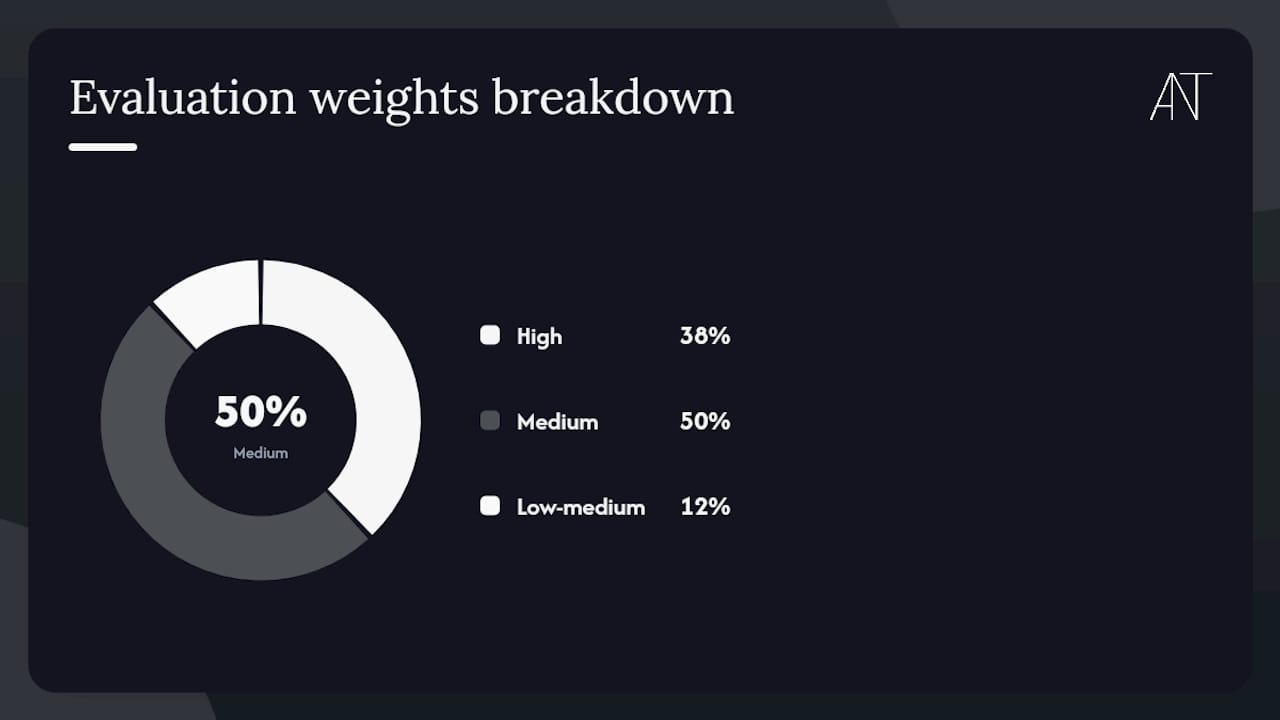
Eight pillars shaped every ranking: data coverage across platforms, reporting and export quality, listening and sentiment depth, competitive benchmarking capability, integrations with Google Analytics and ad platforms, ease of use and team collaboration, support quality, and pricing transparency.
Testing approach:
- Hands-on trial checks across free and entry-paid tiers, verifying which features are genuinely accessible without a sales call
- Trial-based feature verification: export formats (CSV, Excel, PDF, PowerPoint), historical data windows, and API access where publicly documented
- Customer review synthesis from documented case studies and verified review platforms
- A scoring matrix weighted toward data coverage (highest), integrations, and reporting quality, with ease of use as a tiebreaker for tools at similar capability levels
Evidence weighting and caveats:
- Enterprise-tier features (Brandwatch, Meltwater, Talkwalker, Sprinklr) often require vendor negotiation; trial access may not reflect full data depth
- Free tiers (Buffer, Looker Studio, Typefully) were evaluated on what they actually deliver without a credit card, not on what a paid upgrade unlocks
- Gartner Peer Insights vendor summaries informed enterprise-tier positioning, particularly for listening depth and global source coverage
| Evaluation pillar | Weight | Why it matters |
|---|---|---|
| Data coverage | High | Determines which platforms and metrics you can actually measure |
| Reporting & exports | High | Drives stakeholder communication and client deliverables |
| Integrations | High | Connects social data to ad spend and web conversions |
| Listening & sentiment | Medium | Separates strategic intelligence from performance reports |
| Benchmarking | Medium | Contextualizes your numbers against competitors |
| Ease of use | Medium | Affects adoption speed and team collaboration |
| Support quality | Low-medium | Matters most at enterprise scale or during onboarding |
| Pricing transparency | Medium | Opaque pricing is a red flag for budget planning |
Tool-by-tool breakdown: what each one does best
Buffer
Buffer’s free tier covers up to three channels with clean engagement and reach reports, making it the most accessible entry point for creators and small teams who want scheduling and analytics in one place. Paid plans start at approximately $6 per month per channel. Platform support spans Instagram, TikTok, X, Facebook, LinkedIn, Pinterest, and Threads. The onboarding is genuinely fast, often under an hour. The tradeoff: no competitive benchmarking and limited historical depth beyond 30 days on lower tiers.
Rival IQ
Built for speed, Rival IQ lets agencies pull a competitor audit in minutes rather than days. Its benchmarking engine surfaces engagement rates, posting cadence, and top-performing content across Instagram, TikTok, X, Facebook, LinkedIn, YouTube, and Pinterest. For teams that need to answer “how does our client compare to the market?” before a pitch, this is the most direct path. Competitive intelligence workflows that pair Rival IQ’s social benchmarks with paid search data give agencies a fuller picture of a competitor’s total presence.
Sprout Social
Sprout Social earns its “best overall” position by holding publishing, analytics, listening, and customer care in a single governed workspace. Mid-market teams get clean cross-platform reports, role-based access, and integrations with Salesforce, HubSpot, and Google Analytics. Platform support is broad: Instagram, TikTok, X, Facebook, LinkedIn, YouTube, Pinterest, and Threads. Free trials are available; paid plans are tiered and priced for teams rather than individuals. The Sprout Social analytics resource is worth reviewing for its breakdown of how to connect social metrics to business outcomes.
Hootsuite
Hootsuite’s analytics product covers more networks than most, pairs with Google Analytics and Adobe Analytics for holistic measurement, and offers competitive benchmarking at enterprise scale. Custom export formats and scheduled report delivery reduce manual aggregation for large teams. The interface has grown complex over years of feature additions, so expect a steeper onboarding curve than Buffer or Sprout. Best suited to enterprises that need broad channel coverage and want a single platform for governance, scheduling, and reporting.
Brandwatch
Brandwatch operates at a different layer than most tools on this list. Where Buffer reports what happened on your own channels, Brandwatch listens to what the broader market is saying about your category, brand, or competitors across social, news, forums, and review sites. Its AI-driven consumer intelligence surfaces trends before they peak. Brandwatch’s own positioning draws a clear line between tools built for reporting and tools built for strategic intelligence — a distinction worth internalizing before you evaluate any listening platform.
Meltwater
Meltwater pairs social listening with earned media monitoring, making it the natural choice for enterprises where PR and social teams share a reporting workflow. Review source integration adds a layer of reputation data that pure social tools miss. Pricing is enterprise-level and negotiated; no self-serve free trial.
Keyhole
Keyhole’s historical conversation tracking is its clearest differentiator. Researchers and campaign managers who need to reconstruct how a hashtag or topic evolved over months, not just weeks, will find its export-oriented interface more useful than tools optimized for real-time dashboards. Supports Instagram, TikTok, X, Facebook, LinkedIn, and YouTube.
Social Status
Social Status automates recurring report delivery in CSV, Excel, PDF, and PowerPoint, and its read-only influencer reporting feature eliminates the screenshot-and-paste workflow that wastes hours in influencer campaign management. Affordable tiered pricing makes it accessible for small businesses running paid social alongside influencer partnerships.
Vista Social
Vista Social combines social publishing and analytics with review management, giving brands a single dashboard for both social performance and reputation signals. Useful for multi-location businesses or any brand where Google and Yelp reviews are as important as Instagram reach.
Tailwind
Tailwind is purpose-built for Pinterest and Instagram visual creators. Its Pinterest analytics go deeper than any general-purpose tool, covering pin performance, board analytics, and audience insights specific to the platform’s discovery mechanics. Not the right choice if Pinterest is a secondary channel.
DashThis
DashThis builds presentation-ready dashboards that pull from social platforms, Google Analytics, and ad networks simultaneously. For agencies that bill clients on cross-channel performance, it removes the manual work of assembling a monthly report from five separate exports. White-label options are available on higher tiers.
Socialinsider
Socialinsider’s AI content-pillar analysis groups your posts by theme and scores each pillar’s performance, giving content strategists a structured way to identify which editorial directions are gaining traction. Competitor analytics are included. Covers Instagram, TikTok, X, Facebook, LinkedIn, and YouTube.
Mention
Mention monitors brand mentions across social and the web in near real-time, with alert configurations that make it practical for PR teams and community managers who need to respond quickly. A free tier exists with limited mention volume.
YouScan
YouScan applies visual AI to social listening, identifying logos, objects, and scenes in images and videos rather than relying solely on text. For consumer brands where visual UGC is a primary signal, this depth is not available elsewhere at the same price point.
Siftsy
Siftsy focuses narrowly on comment analytics for TikTok and Instagram, extracting sentiment and themes from comment sections to surface what audiences actually think about content. A niche tool, but a precise one for creators and brands running high-volume video campaigns.
Typefully
Typefully serves X and LinkedIn creators who want scheduling, thread drafting, and basic performance analytics in a clean, distraction-free interface. Free tier available; analytics depth is limited compared to full-platform tools.
Talkwalker
Talkwalker competes directly with Brandwatch at the enterprise listening tier, with strong AI-driven trend detection and broad source coverage across social, news, podcasts, and TV. Pricing is enterprise and requires a demo.
Google Analytics
Google Analytics tracks how social traffic converts on your website, making it the essential complement to any social analytics platform. UTM parameters connect social posts to sessions, goals, and revenue. Free, with a learning curve on GA4’s event-based model.
Sprinklr
Sprinklr’s unified platform synthesizes intent, sentiment, and conversion data into views that inform product, customer experience, and marketing decisions simultaneously. It is the most complete enterprise option on this list, covering publishing, care, listening, and analytics in a single governed environment. The implementation timeline is measured in weeks, not hours.
Brandwatch (Cision)
The Cision-integrated version of Brandwatch adds PR distribution and media contact data to the core listening platform, making it the natural fit for communications teams that need to measure both earned and social media in one workflow.
Zoho Social
Zoho Social integrates natively with Zoho CRM, making it the practical choice for SMB teams already in the Zoho ecosystem. Reporting covers the major platforms; the interface is clean and the pricing is competitive.
SOCi
SOCi is built for multi-location brands managing local social presence at scale, with reputation management and local reporting layered on top of standard social analytics. Useful for franchise brands and retail chains.
Semrush
Semrush’s social module connects social performance data with SEO and paid search metrics, giving teams a cross-channel view that few pure social tools can match. For teams already using Semrush for SEO, the social add-on is a natural extension.
Looker Studio
Looker Studio (formerly Google Data Studio) is free and connects to virtually any data source via native or third-party connectors. The tradeoff is setup time: building a useful social dashboard requires manual connector configuration and some familiarity with data modeling. For agencies comfortable with that investment, the output is fully customizable and white-labelable.
Whatagraph
Whatagraph targets agencies with multi-client reporting needs, offering white-label reports, cross-channel data blending, and scheduled delivery. Covers Instagram, TikTok, X, Facebook, LinkedIn, YouTube, and major ad platforms.
Later
Later’s visual content calendar and link-in-bio analytics make it a natural fit for Instagram and TikTok creators who prioritize content planning alongside performance tracking. A free tier covers basic scheduling; analytics depth increases with paid plans.
Pro Tip: Before committing to any paid plan, request a sample export in the format your team actually uses for stakeholder reports. A tool that produces beautiful dashboards but exports only PDFs when your finance team needs Excel is a workflow problem you will discover too late.
How to choose the right social media analytics tool for your team
The shortest answer: match the tool’s category to your primary job. Reporting tools (DashThis, Whatagraph, Looker Studio) serve agencies building client deliverables. Listening platforms (Brandwatch, Talkwalker, Meltwater) serve teams doing strategic intelligence. Integrated platforms (Sprout Social, Hootsuite, Sprinklr) serve teams that need publishing and analytics in one governed space. Choosing a listening platform when you need a reporting tool, or vice versa, is the most common and most expensive mistake in this category.
Decision checklist:
- Which platforms generate your most important data? (Confirm the tool covers all of them natively, not via workarounds)
- What export formats does your team or client require? (CSV, Excel, PDF, PowerPoint)
- Do you need ad data integrated? (Meta, Google, TikTok Ads — without this, you cannot prove social ROI)
- Is influencer reporting part of your workflow? (Look for read-only influencer connections or consolidated exports)
- How much historical data do you need? (Some tools cap at 30–90 days on entry tiers)
- How many users need access, and do you need role-based permissions?
- What is your monthly budget, and does the vendor publish pricing openly?
- Do you need a dedicated account manager or SLA-backed support?
Vendor demo checklist — ask for these specifically:
- Request a live export in your required format from a real dataset, not a demo environment
- Ask for the exact historical data window on the plan you are evaluating
- Confirm API access availability and rate limits if you plan to build custom reports
- Ask to see the read-only influencer reporting view if influencer campaigns are part of your work
- Request a sample of how the tool integrates with Google Analytics or your ad platform of choice
Centralizing organic social data with ad platform metrics is not optional for teams that need to prove ROI. Without those integrations, you will spend hours reconciling separate reports every month.
Red flags during trials:
- Data sampling disclosed only in fine print (not upfront in the trial UI)
- Pricing available only after a sales call
- No raw data export or API access on any plan
- No Google Analytics or ad platform integration
- Historical data window shorter than your typical campaign cycle
Pro Tip: Run any shortlisted tool against your last 90 days of real data before you buy. A tool that looks clean in a demo environment but struggles with your actual account structure, posting volume, or platform mix will surface that gap immediately.
What does automated reporting actually save your team?
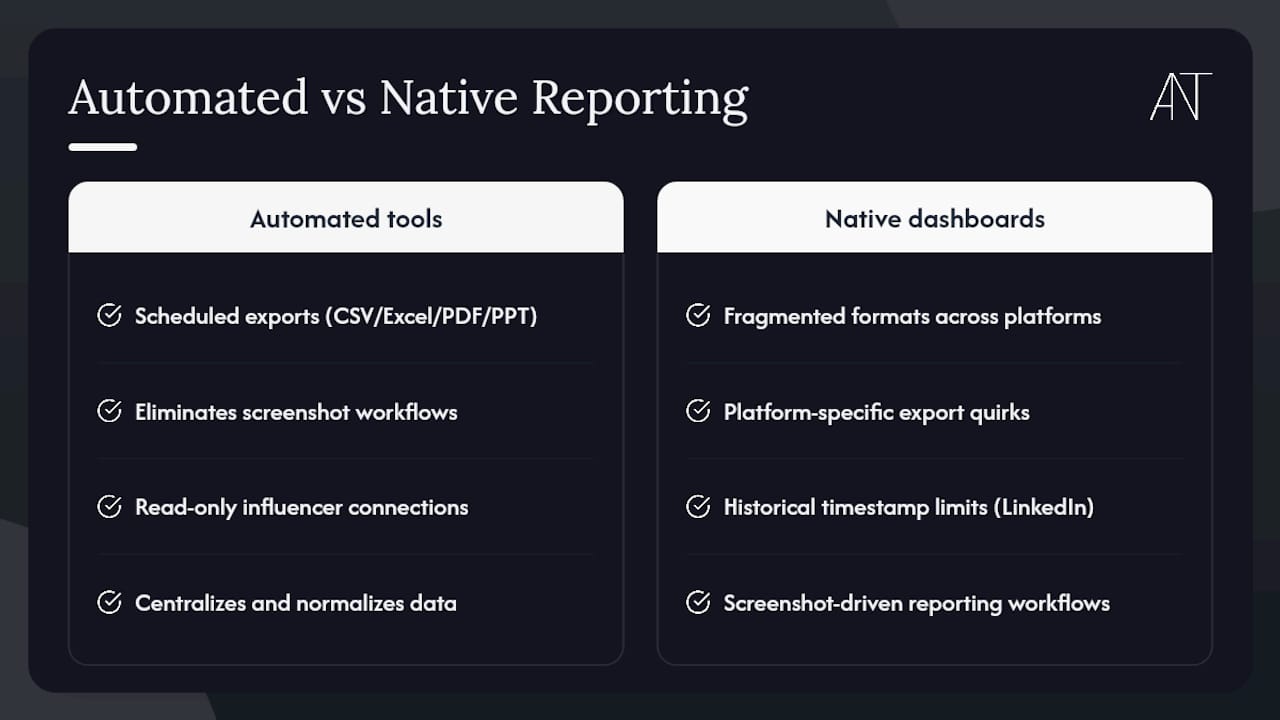
Automated reporting is not a convenience feature. Professional social analytics platforms that schedule recurring exports in CSV, Excel, PDF, and PowerPoint formats remove a category of manual work that compounds across every reporting cycle. Social Status’s feature set illustrates the pattern clearly: automated report delivery and read-only influencer connections eliminate the screenshot-driven workflows that practitioners describe as among the most time-consuming parts of social media management.
The deeper issue is fragmentation. Native dashboards on Instagram, TikTok, LinkedIn, and Facebook each present data in their own formats, with their own historical limits and their own export quirks. LinkedIn’s historical timestamp limitations, for example, are a documented blind spot that third-party tools address by centralizing and normalizing data across sources. Dedicated ads analytics modules within third-party platforms connect dollar amounts to engagement in ways that native ad managers, optimized for campaign execution, rarely deliver cleanly.
Statistic callout: Professional tools that offer automated reporting and read-only influencer connections directly reduce manual aggregation time compared to native dashboards — a finding supported by Social Status’s documented feature capabilities and consistent with how agencies describe their reporting workflows.
The practical implication: if your team spends meaningful time each month pulling screenshots, copying numbers between spreadsheets, or reconciling ad data with organic metrics, the ROI of a paid analytics platform is often visible within the first reporting cycle.
Pro Tip: Set up automated weekly exports on day one of any trial. If the tool cannot deliver a clean, scheduled export to your inbox without manual intervention, that limitation will define your entire experience with it.
The metrics obsession that is quietly misleading most teams
The conventional advice in social media analytics is to measure everything, then optimize toward the metrics that move. It sounds rigorous. In practice, it produces teams that are fluent in engagement rates and reach figures while remaining uncertain about whether any of it connects to revenue.
The more useful frame is to start with the decision the data needs to support, then work backward to the metric. A brand manager deciding whether to double down on TikTok needs conversion attribution data and audience overlap analysis, not a higher engagement rate. A creator evaluating which content pillars to build needs theme-level performance data, not total impressions. The tools that earn their place in a serious workflow are the ones that make those specific decisions faster and more defensible, not the ones with the most impressive dashboards.
There is also a category confusion that costs teams real money. Listening platforms and reporting tools are frequently evaluated against each other as if they are substitutes. They are not. Brandwatch and Talkwalker are built to surface what the market is saying; Sprout Social and Hootsuite are built to manage what your brand says and measure how it lands. Buying a listening platform when you need a reporting tool means paying enterprise prices for capabilities you will rarely use, and vice versa.
The most underused capability across this entire category is the ad integration. Teams that connect their social analytics platform to Meta Ads, Google Ads, and TikTok Ads gain a view of total campaign ROI that no native dashboard provides. That single integration, more than any listening feature or AI insight, is what transforms a social analytics tool from a reporting convenience into a genuine business intelligence layer.
The content behind the metrics: where ANT Management fits
Every analytics platform on this list measures what content does after it goes live. What it cannot do is determine the quality, direction, or creative authority of that content before it reaches an audience. For brands whose social performance depends on talent, whether that means models, influencers, content creators, or production professionals, the metrics only tell part of the story.
ANT Management connects brands with rigorously curated global talent across fashion, commercial, and digital creative categories, from influencers and content creators to photographers, stylists, and videographers. Where the tools above measure reach and sentiment, ANT Management shapes the visual and editorial identity that gives those numbers meaning. The agency’s international network spans Europe, the US, and Asia, with talent selected through a process that prioritizes both creative fit and professional reliability.
For brands running influencer campaigns, editorial shoots, or content production programs, the gap between strong analytics and strong performance often comes down to the talent behind the lens and in front of it. Explore ANT Management’s talent roster and connect with the team to discuss how curated talent can strengthen the creative foundation your analytics are measuring.
Sources
The following sources informed this roundup and are worth consulting directly for feature verification, enterprise due diligence, and deeper platform documentation.
- The 11 Best Social Media Analytics + Reporting Tools in 2026
- Social Media Analytics Tools for 2026 | Sprinklr
- Social Status features
- Social Media Analytics Tools - Hootsuite Analytics
- Best Social Analytics Applications Reviews 2026 | Gartner Peer Insights