
Six Campaign Moodboard Examples Every Creative Team Should Know

The right campaign moodboard depends on the decision you’re trying to force. A single-slide board with 9 to 16 annotated references works for fast stakeholder sign-off. An A versus B directional board resolves split leadership opinions. A production-spec board, with hex codes and a “not this” column, is what you hand to a photographer the morning of the shoot. Start with Milanote’s marketing campaign template or Canva, pull 10 to 16 references, and timebox the collection phase.
- Single-slide board: quick internal approvals
- A vs B board: breaks decision gridlock
- Production-spec board: hands off to the shoot day crew
- Set a 30 to 60 minute timer and start collecting now
Key Takeaways
Effective campaign moodboards work because they force one clear visual decision through 10 to 16 annotated references, not because they collect inspiration.
| Point | Details |
|---|---|
| Match board type to decision | Use a single-slide board for approvals, A vs B for split opinions, production-spec for shoot day. |
| Keep it scannable | Cap references at 16 to 20 images with a one-line annotation on each. |
| Include a “not this” column | Two or three rejected images cut revision cycles more than any amount of extra polish. |
| Convert approvals to specs | Extract hex codes, type rules, and a lighting note before handoff. |
| Route casting through ANT Management | ANT Management matches approved moodboard direction to real talent and manages production logistics. |
Table of Contents
- Six Campaign Moodboard Examples and What Each One Says
- What Belongs on a Campaign Moodboard?
- How Do You Build a Campaign Moodboard Step by Step?
- Which Tool Should You Use for Your Moodboard?
- How ANT Management Builds a Talent-Driven Campaign Board
- Tailoring Moodboards to Different Campaign Goals
- Getting Stakeholder Feedback Without Losing the Direction
- From Moodboard to Booked Shoot: What Happens Next
- Sources
Six Campaign Moodboard Examples and What Each One Says
Every moodboard format sends a different message to the people reviewing it. Pick the wrong one and you’ll spend three meetings clarifying what should have been obvious on slide one.
- Single-slide campaign board. Nine to 16 annotated images on one page, built for a five-minute stakeholder scan rather than a scroll session. This is the workhorse format for internal reviews.
- A vs B directional board. Two competing visual directions, side by side, each with its own color story and typography. Useful the moment a creative director and a CMO disagree on tone, since it turns a vague debate into a binary choice.
- Photography-first shoot board. Built around lighting quality, pose energy, and wardrobe silhouette rather than layout. Photographers recommend 10 to 20 images with a one-line note on what each frame is teaching the crew.
- Social and ad-format board. Includes actual 9:16 and 1:1 frame mockups, not just inspiration images, so nobody discovers a headline doesn’t fit vertical crop until after the shoot.
- Brand refresh board. Palettes, typeface pairings, and UI or packaging examples laid side by side to keep a multi-market rollout visually consistent.
- Production-spec board. The final evolution: hex values, type rules, and a “not this” column of two or three rejected directions, ready to hand to a production team.
Pro Tip: Build the single-slide board first, always. Every other format on this list is really a variation of it, just with a narrower job to do.
What Belongs on a Campaign Moodboard?
A campaign moodboard needs five components to function as more than a vision-board exercise: a hero image that anchors the tone, supporting images that reinforce it, a color palette of three to five hex swatches, one or two type examples, and a sample headline or copy hook. Add a texture or material reference when the campaign involves physical product or set design.
Mood boards work as visual planning tools precisely because they combine images, color, type, and short phrases in one place instead of scattering that information across five different documents. That consolidation is what speeds approvals.
Two rules make the difference between a board that inspires and one that actually gets used on set:
- Annotate every image with a single line naming its job: “lighting reference,” “pose energy,” “wardrobe texture.”
- Add a “not this” column with two or three images the direction explicitly rejects.
- Cap the board at 16 to 20 images total.
Statistic Callout: Industry guidance puts the sweet spot at 9 to 16 annotated references per direction. Beyond 20, a board stops being scannable and starts functioning as a mood dump nobody reads past the first row.
How Do You Build a Campaign Moodboard Step by Step?
Building a usable board is less about taste and more about sequence. Skip a step and you’ll end up re-collecting references halfway through a shoot week.
- Collect broadly, fast. Give yourself 30 to 60 minutes and pull from Pinterest, Instagram, film stills, and the Meta Ad Library if you’re mapping competitor tone. Practitioners recommend gathering 40 to 50 items before you even think about narrowing.
- Curate by job, not by vibe. Group references into buckets: lighting, pose, color, copy. Then cut ruthlessly until you’re at 10 to 16 images. Every survivor should answer one question: why is this here?
- Annotate and route for approval. One decision-maker reviews first. If the room is split, don’t argue in the comments; convert it into an A vs B board and force a binary choice.
- Convert to production constraints. Once a direction is approved, extract 3 to 5 hex codes, 2 to 3 type rules, a one-sentence lighting note, casting parameters, and a two-item “not this” column. This becomes the final slide, not a separate document nobody opens.
Pro Tip: Run a quick competitive gap review before you finalize a direction. Pulling recent competitor ads from the Meta Ad Library often reveals the one tonal lane nobody else in your category is using.
A full first pass, from empty board to approved production slide, can realistically happen in under 90 minutes if you hold the timebox.
Which Tool Should You Use for Your Moodboard?
The right tool depends on who’s looking at the board and what happens after they approve it.
- Milanote handles annotated, collaborative boards well and is built specifically for marketing campaign moodboards with images, palettes, and layout notes in one canvas.
- Storyflow is the right call when the moodboard, creative brief, and shot list all need to live on one connected canvas instead of three disconnected files.
- Canva produces the most polished client-facing deliverable when the board is leaving your internal team.
- Pinterest is still unmatched for fast, wide collection before you’ve committed to a direction.
- Figma is the better handoff point once designers need to build off the approved references directly.
For output: a single-slide PDF wins for client review, a live canvas wins for iteration, and Figma wins for design-team handoff. Share one link when possible, export an annotated PDF for external vendors, and split multi-direction boards into separate slides so nobody approves the wrong one by accident.
How ANT Management Builds a Talent-Driven Campaign Board
A moodboard for a fashion campaign carries a job that a generic ad board doesn’t: it has to cast a face, not just a color palette. ANT Management builds these boards around casting direction alongside the usual visual references, because the model is part of the visual language, not an afterthought layered on top of it.
- Model mood references: energy, expression range, movement style
- Shot framing and lighting direction matched to the casting brief
- Wardrobe swatches and location texture references side by side
- Casting notes with sample headshots attached directly to the board
A campaign board that separates “who we’re casting” from “what it looks like” produces mismatched shoots. The two decisions have to happen on the same page, reviewed by the same people, at the same time.
ANT Management pairs this with scheduling and logistics notes so the board doubles as a production document. See how that plays out on the modeling agency landing page.
Tailoring Moodboards to Different Campaign Goals
A board built for a luxury rebrand and a board built for a performance-marketing ad set should look nothing alike, even if they’re selling variations of the same product. The mismatch between goal and visual register is one of the most common reasons approved boards still produce weak creative.
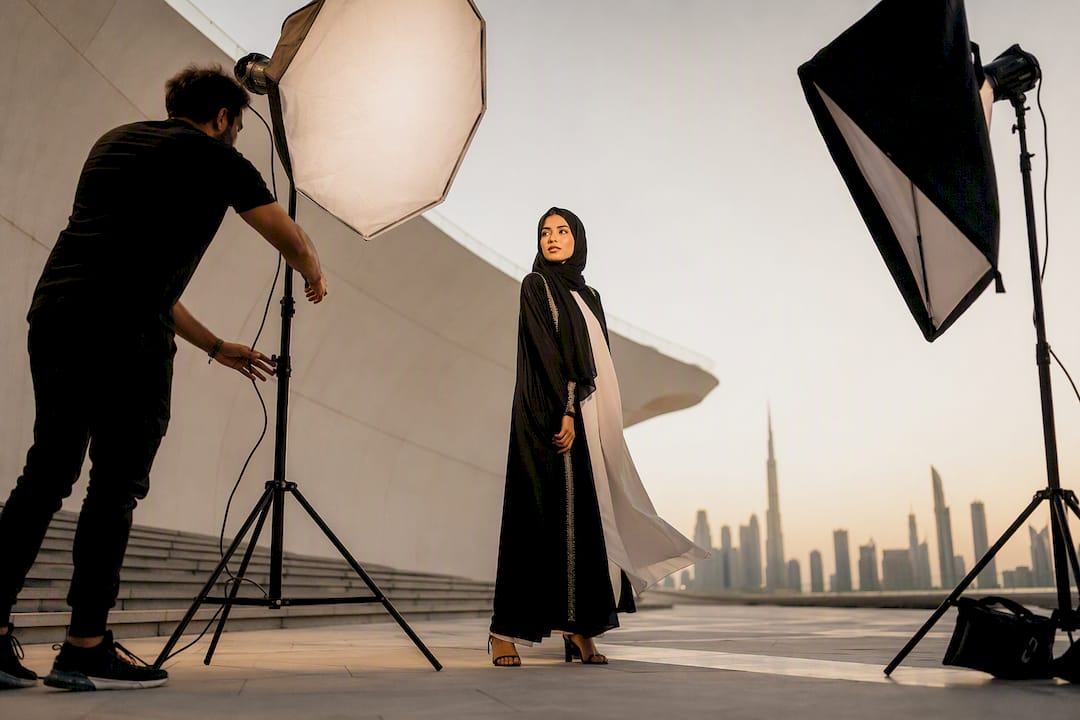
For brand awareness campaigns, lean into mood over information. Fewer copy hooks, more atmosphere: lighting, texture, emotional tone. The board should feel closer to an editorial spread than a spec sheet, because the goal is recognition and feeling, not a click.
For direct-response or performance campaigns, flip that ratio. Include actual ad-frame mockups at 9:16 and 1:1, real headline copy tested against the visual, and a clear call-to-action placement reference. A gorgeous lighting reference means nothing if nobody can picture where the “Shop Now” button sits.
For audience-specific campaigns, swap out generic stock-style references for images that reflect the actual demographic and cultural context of the buyer. A board aimed at Gulf luxury consumers needs different wardrobe, setting, and casting references than one built for a Southeast Asian e-commerce audience, even under an identical brand umbrella.

For multi-market rollouts, build one master board with the non-negotiable brand elements (palette, typography, logo lockup) and separate satellite slides per region for casting, wardrobe, and location. That keeps consistency at the top while allowing legitimate local variation underneath it.
The test in every case: does the board’s visual weight match what the campaign is actually trying to accomplish?
Getting Stakeholder Feedback Without Losing the Direction
Feedback rounds are where good moodboards go to die, usually because the request for input was too open-ended. “What do you think?” invites five conflicting opinions. “Which of these two directions gets us closer to the brief?” invites a decision.
Route the board to a single decision-maker first, even in organizations where multiple people technically sign off. That person filters obvious no’s before the wider group ever sees the board, which cuts review cycles significantly. If leadership genuinely can’t agree after that first filter, don’t keep iterating on one board. Split it into an A vs B format and force a binary vote instead of an open critique.
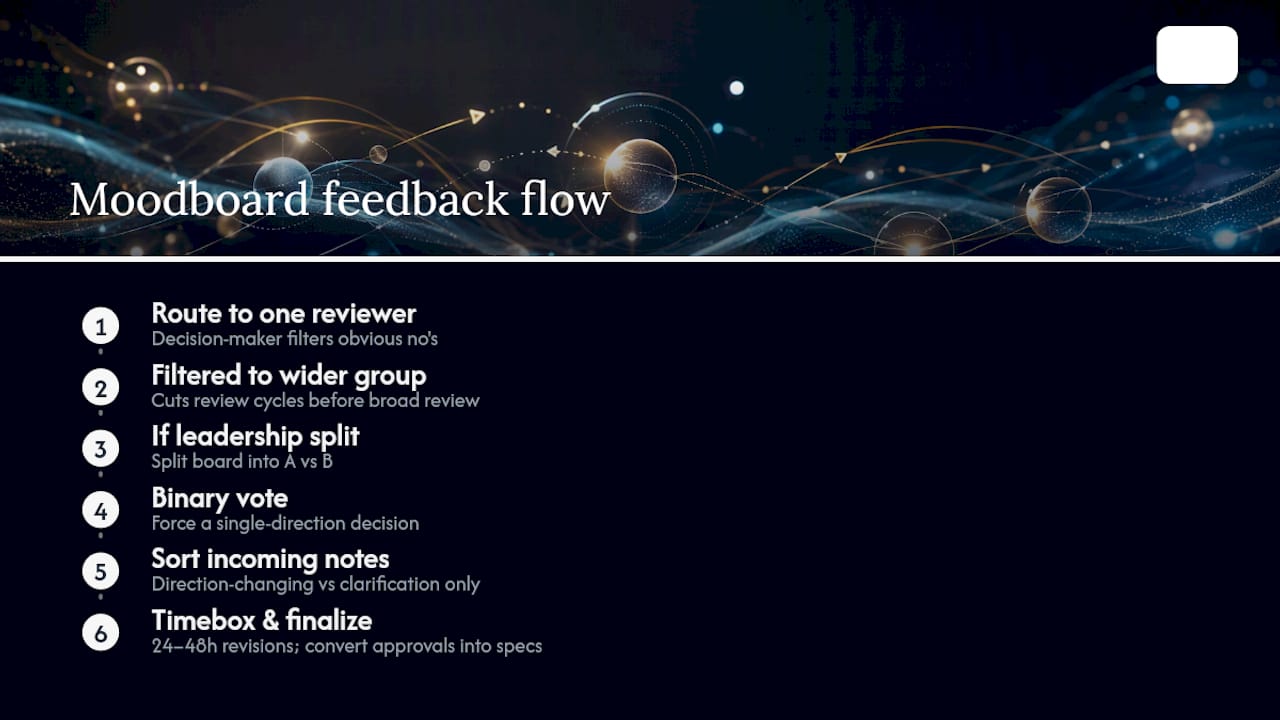
When feedback does come in, sort it into two buckets: notes that change the direction (wrong tone, wrong casting energy, wrong color story) and notes that just need clarification (someone doesn’t understand what a texture swatch means). Only the first bucket should trigger a real revision.
Timebox every revision round. Give the team 24 to 48 hours to respond, not an open-ended window that lets a project drift for two weeks over font choices. Once a direction gets approved, resist the urge to keep tweaking it. The written creative brief paired with the board is what actually protects the shoot, not one more round of moodboard polish. A board without a brief risks producing creative that’s on theme but strategically pointless. Once you’ve converted approvals into hard specs, the board’s job is done.
A Practitioner’s Checklist for Campaign Moodboards
One decision-maker, annotated references, 10 to 16 images, a “not this” column, then hard specs after signoff. That’s the sequence.
Common failures: boards with 40 unannotated images nobody can scan, three visual directions mashed into one slide, and approved boards missing the hex codes and type rules a production team actually needs.
Fixes are simple: force binary choices when opinions split, timebox every edit round, and start from a pre-filled spec template so the conversion step isn’t optional.
From Moodboard to Booked Shoot: What Happens Next
A moodboard is only as good as the production it produces. Most creative teams lose momentum right at the handoff, when an approved board sits in a shared folder while someone scrambles to find talent that actually matches the casting direction. That gap is where revisions multiply and budgets slip.
ANT Management closes that gap directly. Beyond talent booking, the agency provides project management and strategic support across fashion, commercial, and influencer campaigns, plus development programs like ANT Camp for talent who need to be shoot-ready. When your production-spec board names a casting direction, ANT Management matches it to real talent instead of asking your team to source blind, which is where most revision cycles start in the first place. Fewer casting mismatches mean fewer reshoots and a tighter timeline from approved board to finished asset. If your next campaign moodboard includes a casting slide, start the conversation on the ANT Management modeling agency page and get talent matched to your direction before the shoot date locks in.
Sources
- Milanote — Marketing Campaign Moodboard Template
- Apex Brands — How to build a mood board for a campaign
- POP Photography — How to make a photoshoot mood board
- Adobe Express — Mood board ideas
- Storyflow — How to create a photoshoot moodboard