
Event Run of Show: 11 Steps and a Pro Template for Production Teams
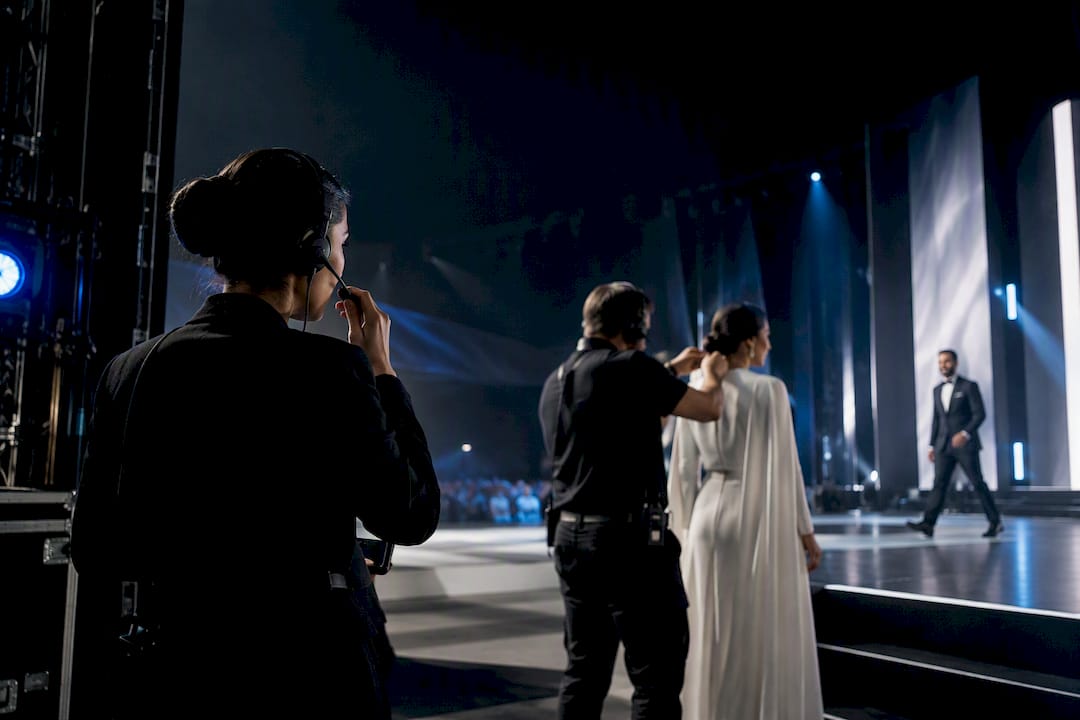
A run of show is the minute-by-minute, cue-by-cue production document that tells your crew exactly what happens, when it happens, and who owns it. Unlike an audience-facing agenda, it exists for the people executing the event, not the people watching it. Its entire purpose is synchronized execution: every department reading the same clock so transitions land without a visible seam.
TL;DR:
- A run of show is a cue-by-cue, minute-by-minute production document focused on technical execution within the performance window, typically lasting two to three hours.
- It should be locked at least 48 hours before the event to prevent conflicting last-minute edits and should have a single designated owner managing all updates during event day.
- The template must include crucial columns such as clock time, cue description, owner, talent, AV/media, mic plan, and contingency instructions, with each cue on a separate row for precise synchronization.
- For multi-department or hybrid events, auto-calculating generators and real-time digital documents help avoid manual timing errors and facilitate team coordination, especially when remote.
- Effective talent briefing involves providing a personalized, condensed run of show with exact walk-on times, mic details, and cues, coordinated in advance by production management to ensure alignment and prevent confusion.
Table of Contents
- What Separates a Run of Show From an Agenda or Schedule
- The Run of Show Template Columns That Actually Matter
- How to Build a Run of Show, Step by Step
- The Production Rules That Prevent Show-Day Disasters
- Should Your Run of Show Be Digital or Printed?
- Briefing Talent Against the Run of Show
- Where ANT Management Fits Into Your Show-Day Execution
- Sources
- FAQ
What Separates a Run of Show From an Agenda or Schedule
Event planners juggle three documents that get confused constantly: the agenda, the master timeline, and the run of show. They serve different audiences, and mixing them up is where most show-day chaos starts.
The agenda is attendee-facing. It tells guests what’s happening and roughly when, without technical detail. The event schedule, sometimes called a master timeline, is planner-facing. It maps vendor load-in, catering windows, and staffing shifts across the full day. The run of show, or ROS, is crew-facing. It’s a minute-by-minute, cue-by-cue operational document that production teams use to execute the actual event, tracking technical cues, transitions, and departmental responsibilities down to the second.
Other names float around for the same core artifact: run sheet, cue sheet, show flow. They all describe versions of the same idea, though the terms shift slightly by industry (broadcast tends to say “cue sheet,” corporate events lean toward “run of show”).
Scope matters here too. A run of show typically covers just the performance portion of an event, often two to three hours, not the entire day. That’s deliberate. Load-in, rehearsal, and breakdown belong in the broader production schedule. The ROS zooms into the window where timing precision actually determines whether the show feels tight or feels like it’s falling apart in real time. Within that window, granularity gets extreme, down to the second for cue triggers, mic cuts, and video rolls.
- Agenda: attendee-facing, general times, no technical detail
- Event schedule: planner-facing, full-day logistics and vendor windows
- Run of show: crew-facing, cue-level precision for the live performance window
The Run of Show Template Columns That Actually Matter
Every strong ROS template runs on the same skeleton. Skip a column and you create a gap someone will fall through on show day.
Clock time, not elapsed time, anchors every row. Writing “1:42 PM” instead of “+12 minutes” keeps every department reading the same reference point, which matters enormously once the show drifts from plan and someone needs to know exactly where things stand right now. Industry templates specify clock time as the standard for this exact reason.
Duration tells the team how long a cue or segment should run, useful for spotting where the day is bleeding time before it becomes a crisis. Cue or action describes what happens, written as a command, not a description: “MC walks on stage right” reads faster under pressure than “the host will be entering.” Talent names who’s performing or speaking. Owner names who’s responsible for triggering or managing that specific cue. AV/media lists the exact asset, file name, or deck slide involved. Mic plan specifies which mic, which channel, and who’s wearing it. Notes/fallback carries the contingency instruction if that row goes wrong.
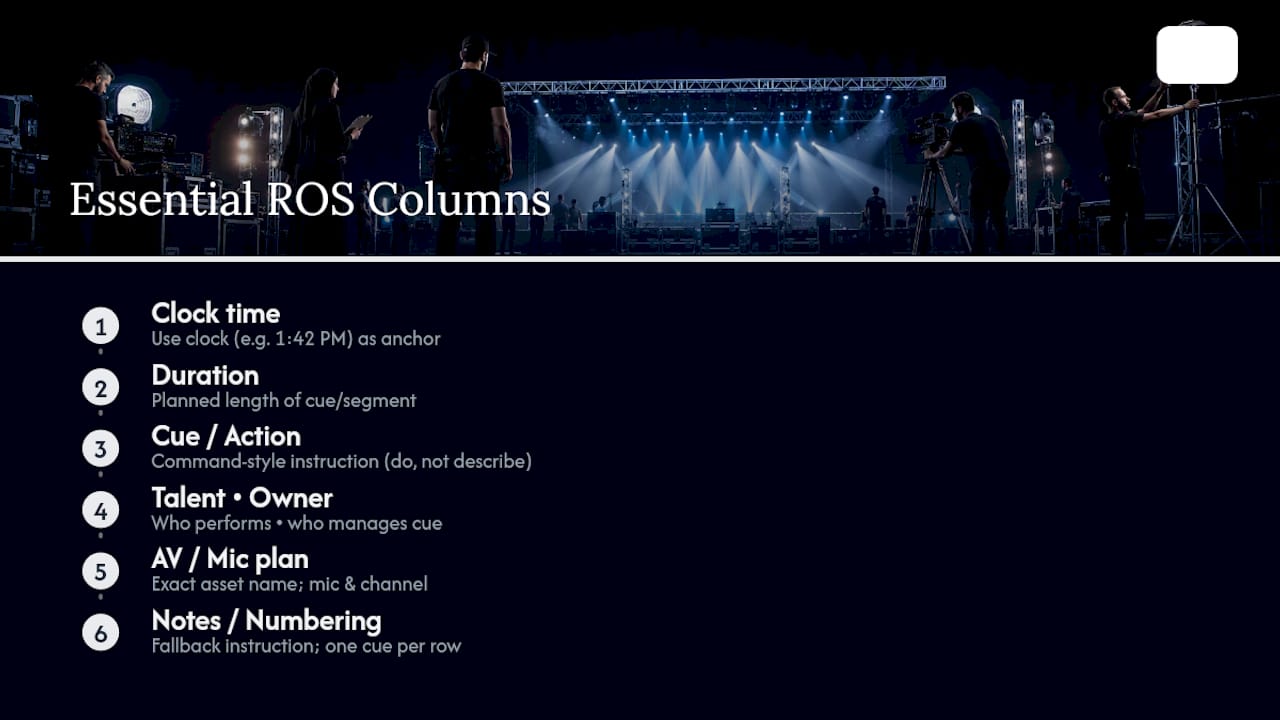
One rule overrides all of this: one cue per row. When multiple departments act at the same second, each gets its own line rather than getting bundled together, and cues get numbered sequentially. That numbering isn’t cosmetic. If timing drifts mid-show, a stage manager can radio “jump to cue 14” and every department re-syncs instantly without anyone re-reading the whole document.
Here’s how that structure looks in practice:
Asset naming deserves its own discipline. “Sizzle_v3_FINAL.mp4” beats “video.mp4” every time a producer is scrambling to find the right file three cues before it’s needed.
How to Build a Run of Show, Step by Step
Building a run of show isn’t a single sitting. It’s a sequence that starts broad and narrows to second-by-second precision.
- Set your hard stops first. Doors, curfew, catering windows, and any venue-imposed cutoffs are fixed points. Everything else gets built around them, not the other way around.
- List every segment in order. Welcome remarks, keynote, panel, performance, closing. This is your skeleton before any timing gets attached.
- Break each segment into individual cues. A “keynote” segment might contain a walk-on cue, a slide-advance cue, a lighting cue, and a walk-off cue. This is where the document earns the name run of show instead of agenda.
- Assign clock times and durations to every cue, working from your hard stops backward and forward until the math holds together.
- Assign an owner to each cue. Every single row needs one name responsible for triggering it. No shared ownership, no assumptions.
- Add mic plans and AV/media details per cue, naming exact files, channels, and devices.
- Write contingency rows for anything that can realistically fail. A mic dropping, a speaker running late, a video file not loading. Each contingency needs a decision owner and a deadline for making that call.
- Add contact information for every owner listed, ideally as a quick-reference block at the top of the document rather than scattered through the rows.
- Lock the document roughly 48 hours before doors. Professional production teams treat this as a hard rule: locking early forces last-minute changes through one gatekeeper instead of five people editing simultaneously.
- Rehearse the transitions, not the content. Run through the seams between segments, the walk-ons, the handoffs. A full technical run-through before doors catches the failures a read-through never will.
- Route all day-of changes through a single show caller. Once locked, nobody edits the ROS independently. Changes get communicated via headset, and the caller updates the document.
Skipping step 9 is the single most common failure point. Teams that keep editing the ROS right up until doors open almost always end up with two versions floating around, and nothing wrecks a show faster than a stage manager and an AV operator working from different timestamps.
The Production Rules That Prevent Show-Day Disasters
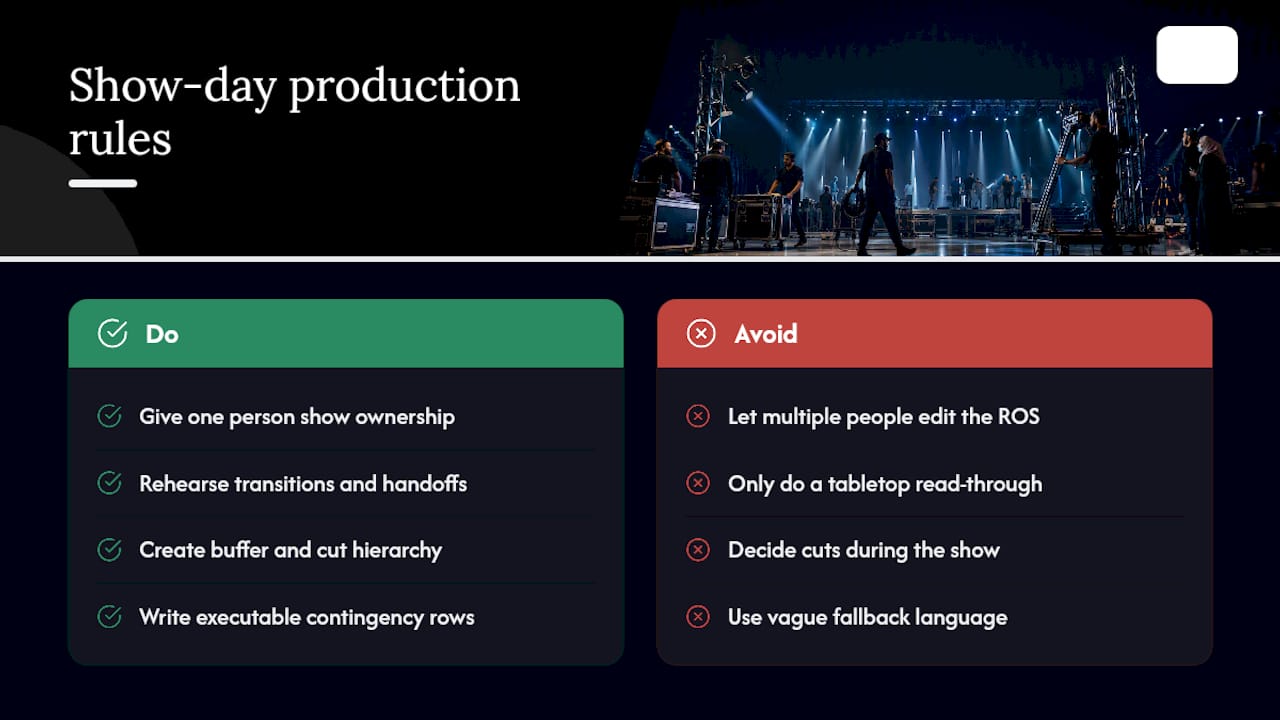
A well-built template still fails without discipline behind it. Four rules separate a document that looks professional from one that actually functions under pressure.
Single ownership is non-negotiable. One show caller owns the ROS during execution. Every change routes through that person, communicated over headset, and gets reflected in the document in real time. Two people editing independently is how a crew ends up running two different timelines without knowing it.
Rehearsal should target transitions, not speeches. Run the handoffs between segments, walk-on timing, and technical cue triggers. A full technical run-through before doors validates whether the cues and handoffs actually work, which a tabletop read-through simply can’t test.
Build in buffer, and know what gets cut first. A short hierarchy helps under pressure: cut Q&A time before cutting the keynote, cut transition applause breaks before cutting the closing remarks. Decide that hierarchy before show day, not during it.
Write fallback rows as executable instructions, not vague warnings. The strongest format names who decide and by when: “If speaker not onstage by 1:05 PM, MC opens networking, stage manager decision by 1:03 PM.” That’s a contingency row that actually functions under pressure, because it removes hesitation exactly when hesitation costs the most time.
Pro Tip: Write your contingency rows before rehearsal, not after. Reading them out loud during the technical run-through exposes vague fallback language fast, and it’s far cheaper to fix on a Tuesday afternoon than at 7:58 PM on show night.
Should Your Run of Show Be Digital or Printed?
The right format depends on how many people need it and how fast the show is moving.
Static spreadsheets work for smaller, simpler shows, but they carry a real risk: when one cue’s duration shifts, every downstream timestamp needs manual recalculation. Purpose-built generators and templates auto-calculate downstream timing when an earlier cue runs long or short, cutting out the manual math errors that quietly wreck a schedule an hour into the show.
For hybrid and virtual events, real-time sync matters even more. Distributed production teams, some in a control room, some remote, need shared countdown timers and a single live document rather than five people refreshing separate copies.
Print still has a place. Stage managers, talent, and mic techs generally want a paper copy taped near their station, since a phone screen dimming or a laptop losing signal shouldn’t take down the show. Virtual events add their own layer: captioning tools, chat moderation cues, and clear links for panelists need their own rows, and live captioning coverage is worth reviewing if accessibility compliance is part of your event brief.
- Spreadsheets suit small, single-location shows with few moving parts
- Auto-calculating generators suit multi-cue, multi-department productions
- Printed copies stay near stage management, mic techs, and talent
- Virtual events need moderator cues, caption links, and chat rows built into the same document
Briefing Talent Against the Run of Show
Talent needs specifics from the ROS, not the full document. A performer or host needs their walk-on time, mic ID and channel, exact wording for their cue, and their rehearsal slot. Handing someone forty pages of cues buried across every department wastes their prep time and buries the three lines that actually apply to them.
The strongest approach we’ve seen production teams use is a printed, individualized ROS segment for each talent, listing exactly when they’re on, which mic they’re wearing, and when their rehearsal window falls. Some agencies coordinate this directly with production teams ahead of show day, aligning talent call times with the locked ROS so nobody’s guessing about arrival windows or walk-on cues.
Before talent or influencers hit the program, confirm: mic plan assigned, walk-on cue written in command form, rehearsal slot booked, and a single point of contact named for day-of questions.
Where ANT Management Fits Into Your Show-Day Execution
A run of show is only as strong as the people executing it. ANT Management supplies the talent, event staffing, and production crew who actually run your cues, hit their marks, and hold the mic plan you built into the document.
That’s the real gap most planners hit: a flawless ROS still needs bodies who’ve been briefed against it, not handed it five minutes before doors. Talent selection, coordination, and briefing as part of the booking process help ensure performers, hosts, and crew arrive already aligned to your walk-on cues and rehearsal slots rather than reading the document cold. For international productions needing influencer talent or specialized creative crew across Europe, the US, and Asia, that coordination layer is what keeps a locked ROS from unraveling once real people and real schedules enter the picture.
Booking terms are straightforward: current rates for talent and staffing are available directly on each booking page, and cancellation and payment terms are listed there as well. If your next production needs talent or crew mapped against a locked run of show, start by browsing available talent or requesting a coordination call through ANT Management.
— ANT
Sources
For a real-world reference, this public run-of-show example (PDF) shows cue-level phrasing and track segmentation in practice. Asana’s run-of-show template groups sections into event information, detailed timeline, technical details, vendor logistics, and contingency plans, a structure worth borrowing regardless of which tool you build in.
- Run of show — AgendaForge glossary
- Run-sheets
- Free Run of Show Template & Live Generator Tool | Centric Events
- What is a run of show? | Chronolio
FAQ
What is a run of show for an event?
A run of show is a minute-by-minute, cue-by-cue production document that tells your crew exactly what happens, when, and who’s responsible. It’s internal-facing and tracks technical cues, transitions, and departmental ownership, unlike an agenda, which is written for attendees.
How do I create a run of show for an event?
Start by setting hard stops like doors and curfew, then list your segments and break each one into individual cues with clock times, owners, and mic or AV details. Lock the document roughly 48 hours before doors, since production teams treat early locking as standard practice to prevent conflicting last-minute edits.
What is a run of show, exactly?
It’s a living operational document, not a static handout, meant to be rehearsed and adjusted right up until it’s locked before show day. Strong versions include contingency rows and a single owner who manages all changes during execution.
Can you provide an example of a run of show?
A typical row includes clock time, a numbered cue, an action written as a command, the talent involved, the owner, the AV or media asset, the mic plan, and a fallback note. A public example document shows this structure applied across lighting, video, and technical tracks for a real event.
Does ANT Management help brief talent against a run of show?
Yes. ANT Management coordinates talent selection, briefing, and rehearsal scheduling directly against a client’s locked run of show, so performers and hosts arrive already aligned to their walk-on cues and mic plans. Details on booking talent are available on the talent booking page.